Details
When there is a conversion of shares, the class of share is changed but the total value and number of shares issued remain unchanged.
Example: John Jones has 100 $1 Ordinary Shares which will be Converted to 100 $1 A Class Shares
Navigation
| From the Main Toolbar, go to Company. |
|
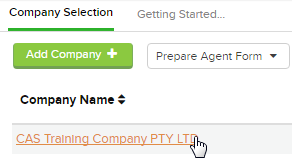
| Select the Company from the list. |
|
| Select Shareholders |  |

Click 
Select Conversions
Instructions
CAS 360 will display the Conversions screen.
|
Field
|
Explanation
|
||||||||||||||||||||||||||
|---|---|---|---|---|---|---|---|---|---|---|---|---|---|---|---|---|---|---|---|---|---|---|---|---|---|---|---|
|
Transaction Date
|
Input the date of the conversion | ||||||||||||||||||||||||||
| Shareholder |
In the shareholder field, CAS 360 will display a list of the company's current shareholders |
||||||||||||||||||||||||||
| Beneficial Owner | CAS 360 will automatically prefill this field if there is a beneficial owner. | ||||||||||||||||||||||||||
|
Share Type
|
In the Share type field, CAS 360 will display a list of the share types the shareholder holds |
||||||||||||||||||||||||||
|
Number of Shares
|
Input the relevant number of shares to be converted | ||||||||||||||||||||||||||
|
New Share Class
|
Select the new share class. (e.g. ORD, B, C) | ||||||||||||||||||||||||||
|
Meeting Status
|
Select the meeting status of the member which will appear on the Resolutions. | ||||||||||||||||||||||||||
| Notes | Type to add extra notes to appear on the Register of Members | ||||||||||||||||||||||||||
|
|||||||||||||||||||||||||||
Click 
Forms Prepared
CAS 360 will display the Document Production screen and automatically select the documents required:
-
- Cover Letter
- Company Change Summary
- Register of Shareholders
- Issued Journal
- Directors Minutes or Resolution
- Notice of Shareholders Meeting
- Shareholders Minutes or Resolution
- Shareholders Consent
- Share Certificate
- Extensive Shareholding List